How to Automate Customer Onboarding with Workflows & AI
Customer onboarding is a critical process that can determine the long-term success of your client relationships. When done effectively, it sets the foundation for customer satisfaction, retention, and growth. However, manual onboarding processes can be time-consuming, inconsistent, and prone to errors. By implementing customer onboarding workflow automation enhanced with AI capabilities, businesses can create a seamless, efficient, and personalized experience for new customers while reducing operational costs and freeing up valuable team resources.
In this guide, we’ll explore how to leverage automation and AI to transform your customer onboarding process, making it more efficient and effective while providing a superior customer experience from day one.
Understanding how to automate Customer Onboarding Workflows
A customer onboarding workflow represents the structured journey a new customer takes from the moment they sign up or purchase your product until they are fully integrated and able to use your product or service effectively. A well-designed customer onboarding workflow ensures that customers quickly realize value and become proficient with your offering.
Defining Effective Onboarding Workflows
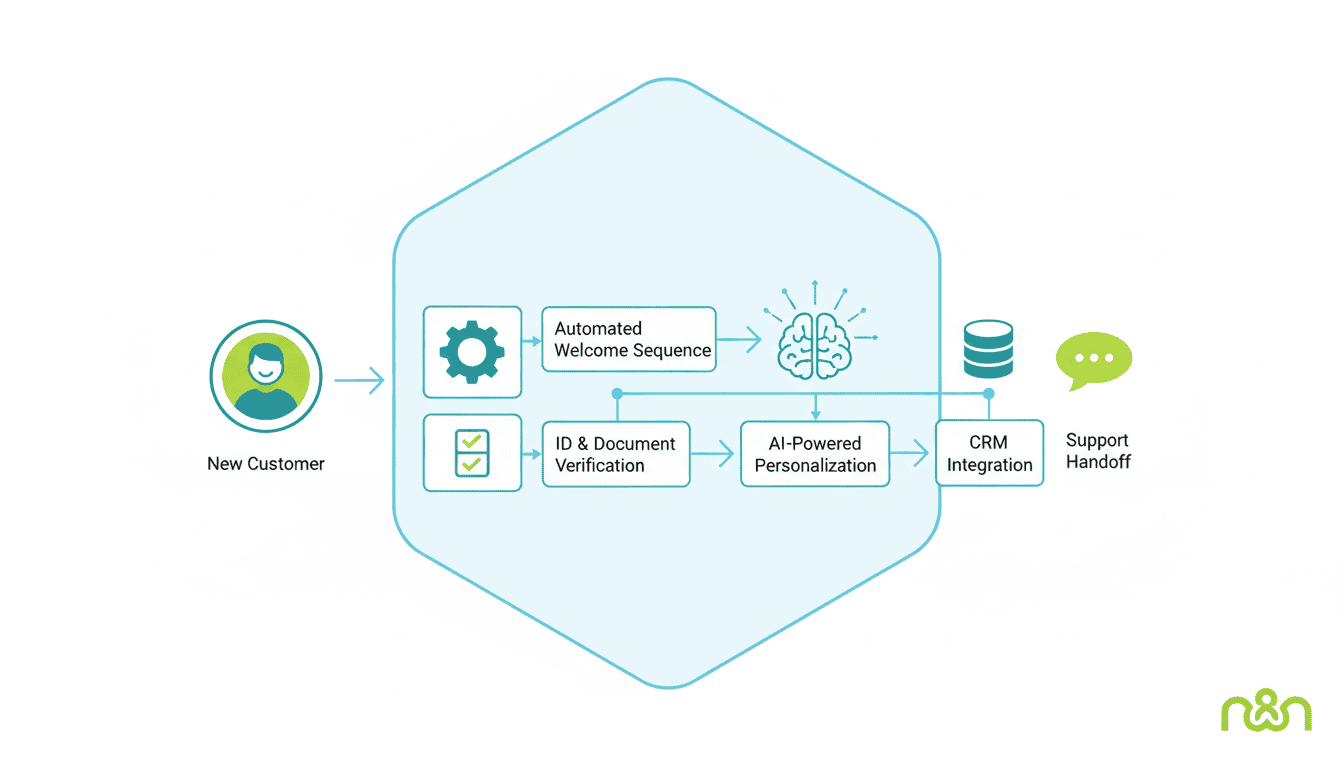
Effective onboarding workflows are systematic, repeatable processes that guide new customers through the initial stages of their relationship with your company. These workflows typically include several key phases:
- Welcome and introduction – Acknowledging the customer’s decision and setting expectations
- Account setup – Guiding customers through necessary configuration steps
- Product education – Teaching customers how to use your product effectively
- Initial success milestone – Helping customers achieve their first win with your product
- Ongoing support and engagement – Ensuring continued success beyond initial setup
The most effective workflows are customer-centric, focusing on the user’s needs and goals rather than simply showcasing product features. They’re also adaptable, allowing for personalization based on customer type, product purchased, or specific use cases.
Key Components of a Customer Onboarding Workflow
A comprehensive customer onboarding workflow includes several essential components that work together to create a smooth transition for new customers:
| Component | Purpose | Automation Potential |
| Welcome Communication | Establish relationship and set expectations | High – automated emails, videos, messages |
| Data Collection | Gather necessary information to customize experience | High – forms, surveys, API integrations |
| Account Setup | Configure user accounts and preferences | Medium – guided setup wizards, templates |
| Training & Education | Educate users on product usage | High – video tutorials, knowledge base, interactive guides |
| Progress Tracking | Monitor customer advancement through process | High – automated checkpoints, completion tracking |
| Feedback Collection | Gather insights for improvement | High – automated surveys, feedback forms |
Each of these components can be enhanced through automation and AI tools, creating a more efficient process while maintaining a personal touch when needed.
Setting Up Automated Onboarding Emails
Email remains one of the most effective channels for customer onboarding, and automated onboarding emails can significantly streamline the process while ensuring consistent communication.
Creating Engaging Email Templates
Effective onboarding emails should be informative, action-oriented, and visually appealing. Here are key elements to include in your automated onboarding email templates:
- Clear, benefit-focused subject lines that encourage opens
- Personalized greeting using the customer’s name and relevant details
- Concise, scannable content with bullet points and short paragraphs
- Prominent call-to-action buttons that guide the next steps
- Helpful resources such as quick-start guides, video tutorials, or FAQs
- Contact information for support if needed
Consider using AI-powered tools to optimize subject lines, personalize content based on user behavior, or suggest the best time to send emails to individual customers for maximum engagement.
Scheduling Email Deliveries
The timing and sequence of your onboarding emails can significantly impact their effectiveness. A well-planned email schedule might include:
- Immediate welcome email – Sent instantly after signup/purchase
- Setup guidance email – Sent 1-2 days later (or sooner if welcome email was opened)
- Feature highlight email(s) – Sent 3-7 days after signup, focusing on key value propositions
- Success story/use case email – Sent 7-14 days after signup
- Check-in and feedback request – Sent 14-30 days after signup
Using workflow automation tools like n8n can help you create sophisticated email sequences that adapt based on customer actions. For example, if a customer completes their profile setup quickly, you can automatically accelerate their journey to the next step rather than waiting for a time-based trigger. Check out these n8n workflow examples for ideas on how to implement adaptive email sequences for small businesses.
Choosing Onboarding Automation Tools
Selecting the right onboarding automation tools is crucial for creating an efficient and effective process that scales with your business.
Popular Tools for Onboarding Automation
The market offers numerous tools to automate different aspects of customer onboarding:
- Email Marketing Platforms: HubSpot, Mailchimp, ActiveCampaign
- Customer Success Platforms: Gainsight, UserIQ, Totango
- In-app Onboarding Tools: Appcues, Pendo, WalkMe
- Video Creation Tools: Loom, Vidyard, Wistia
- Document Management: DocuSign, PandaDoc, HelloSign
- Workflow Automation: n8n, Zapier, Make (formerly Integromat)
- AI-powered Assistants: Intercom, Drift, Ada
Many businesses find that implementing AI agent workflows can further enhance their onboarding automation by providing intelligent, adaptive assistance throughout the customer journey.
Evaluating Tools Based on Your Needs
When selecting onboarding automation tools, consider these factors:
- Integration capabilities – Does it connect with your existing tech stack?
- Scalability – Can it grow with your business and customer base?
- Customization options – Can you tailor the experience to match your brand and process?
- Analytics and reporting – Does it provide insights into onboarding effectiveness?
- Ease of use – Can your team implement and maintain it without extensive technical resources?
- Cost vs. ROI – Does the investment make sense for your business size and needs?
For businesses looking to understand the capabilities of workflow automation tools, learning what is n8n can provide insight into how these platforms can connect various systems and automate complex processes without requiring extensive coding knowledge.
Implementing Welcome Sequence Automation
A well-crafted welcome sequence is often the first extended interaction a customer has with your business after purchase or signup, making it a critical component of the onboarding process.
Designing a Welcome Sequence
An effective welcome sequence automation should guide new customers through their initial experience with your product or service in a logical, value-focused manner:
- Initial welcome and thank you – Express appreciation and set expectations
- Account setup guidance – Help them complete essential configuration
- “Quick win” instructions – Show them how to achieve immediate value
- Feature education – Gradually introduce key features based on their progress
- Success stories and use cases – Show how others achieve results with your product
- Support resources – Highlight where to get help if needed
The sequence should be dynamic, adapting based on customer actions and engagement. For example, if a customer has already completed their profile, the system should automatically skip reminders about that step and move them to the next valuable action.
Measuring the Effectiveness of Your Welcome Sequence
To ensure your welcome sequence automation is achieving its goals, track these key metrics:
- Engagement rates – Email opens, clicks, and in-app activity
- Completion rates – Percentage of users completing each onboarding step
- Time to value – How quickly users reach their first success milestone
- Support ticket volume – Reduction in basic questions during onboarding
- Early retention rates – User retention at 7, 14, and 30 days
- Feedback scores – Customer satisfaction with the onboarding experience
Regularly review these metrics and use A/B testing to continuously refine your welcome sequence for better results.
SaaS Customer Onboarding Automation Best Practices
SaaS businesses face unique onboarding challenges due to the recurring nature of their business model and the need to demonstrate ongoing value to customers.
Common Challenges and Solutions in SaaS Onboarding
| Challenge | Automation Solution |
| Low feature adoption | Triggered in-app guides based on user behavior and contextual tooltips |
| Incomplete setup | Automated progress tracking with gentle reminder notifications |
| Information overload | Drip-fed content delivery based on user progression and interest |
| Generic experience | AI-powered personalization based on user role, industry, and behavior |
| User abandonment | Re-engagement workflows with personalized value propositions |
Implementing AI agents for small business onboarding can help address many of these challenges by providing intelligent, 24/7 support that adapts to individual customer needs.
Continuous Improvement of the Onboarding Process
SaaS customer onboarding automation should never be a “set it and forget it” initiative. Best practices include:
- Regular review of analytics to identify drop-off points in the onboarding funnel
- Customer feedback collection at key stages of the onboarding process
- A/B testing of different onboarding sequences, content, and timing
- Cross-functional collaboration between customer success, product, and marketing teams
- Competitive analysis to stay informed about industry best practices
- Periodic complete revisions of the onboarding flow as your product evolves
Successful SaaS companies view onboarding as a critical business process that deserves ongoing investment and optimization.
Resources
Useful Tools and Software for Automation
Here are some tools that can help you implement effective customer onboarding automation:
- HubSpot – Comprehensive marketing, sales, and service platform with powerful automation capabilities
- n8n – Open-source workflow automation tool that connects various systems
- Intercom – Customer messaging platform with onboarding and support automation
- Userpilot – Product experience platform for SaaS onboarding and user adoption
- Chameleon – In-product tours and onboarding experiences
- Notion Automations – For document and process management automation
Guides and Tutorials for Further Learning
Expand your knowledge about customer onboarding automation with these resources:
- ProductLed’s Guide to Customer Onboarding
- n8n Workflow Examples for Small Businesses
- UserGuiding’s Customer Onboarding Automation Guide
- AI Agent Workflows: Design & Orchestration
Conclusion
Automating your customer onboarding process isn’t just about efficiency—it’s about delivering a consistent, high-quality experience that sets the foundation for long-term customer success. By implementing well-designed customer onboarding workflows enhanced with AI capabilities, you can reduce time to value, increase customer satisfaction, and ultimately improve retention rates.
Start by mapping your current onboarding process, identifying bottlenecks and manual tasks that could be automated. Then, select the right tools for your specific needs, focusing on those that integrate well with your existing systems. As you implement automation, continuously monitor results and gather customer feedback to refine your approach.
Remember that while automation handles the heavy lifting, the human touch remains important—especially for complex products or enterprise customers. The most successful onboarding processes blend automation efficiency with strategic human interactions at pivotal moments.
Frequently Asked Questions
What is the difference between customer onboarding and user onboarding?
Customer onboarding typically refers to the broader process of integrating a new customer into your business, which may include contract signing, payment setup, and relationship building. User onboarding focuses specifically on teaching individuals how to use your product effectively. For SaaS companies, these processes often overlap, but enterprise solutions might onboard multiple users within a single customer organization.
How long should an automated customer onboarding process take?
The ideal length varies by product complexity and customer type. Simple products might complete onboarding in days, while complex enterprise software could have onboarding processes spanning several weeks. The key is to reach the customer’s first “value moment” as quickly as possible, then continue education at an appropriate pace.
Can AI completely replace human interaction in customer onboarding?
While AI can handle many aspects of onboarding, most businesses find a hybrid approach most effective. AI and automation excel at consistent delivery of information, guidance, and routine tasks, while human interaction adds value for complex questions, relationship building, and handling unique situations that fall outside standard processes.
How do I measure the ROI of automating my customer onboarding process?
Calculate ROI by comparing the cost of implementing and maintaining automation against benefits like reduced staff time per customer, faster time-to-value, increased product adoption, higher customer satisfaction scores, and improved retention rates. Most businesses see both immediate efficiency gains and longer-term revenue benefits from improved customer relationships.
What’s the biggest mistake companies make when automating onboarding?
The most common mistake is focusing too much on product features rather than customer goals. Effective onboarding automation should guide customers toward achieving their objectives with your product, not simply walk them through a feature tour. The second biggest mistake is failing to personalize the experience based on customer type, needs, and behavior.