How to Automate Invoice Processing for Small Businesses
For small businesses, managing invoices can be time-consuming and prone to errors. Automating invoice processing can transform your financial operations, saving valuable time and resources while improving accuracy. Invoice automation allows small businesses to capture, process, and pay invoices with minimal manual intervention. In this guide, we’ll explore how to effectively automate invoice processing for your small business, from selecting the right software to implementing comprehensive financial automation strategies.
Choose the Right Invoice Automation Software
The foundation of efficient invoice processing automation starts with selecting the right invoice automation software. With numerous options available, small businesses need to carefully evaluate which solution aligns with their specific needs, budget, and existing systems.
Top Features to Look for in Software
When evaluating invoice automation software, focus on these essential features:
- Optical Character Recognition (OCR) capabilities: Technology that accurately extracts data from invoices
- Multi-format support: Ability to process PDF, paper, email, and various digital invoice formats
- Customizable approval workflows: Flexible routing options based on your business hierarchy
- Accounting software integration: Seamless connection with QuickBooks, Xero, or other accounting platforms
- Mobile accessibility: Approve and manage invoices on-the-go
- Reporting and analytics: Insights into processing times, vendor performance, and spending patterns
- Duplicate detection: Automatic flagging of potential duplicate invoices
Comparing Popular Invoice Automation Solutions
Here’s a comparison of popular invoice automation solutions suitable for small businesses:
| Solution | Best For | Key Features | Price Range |
| QuickBooks AP Automation | QuickBooks users | Native integration, email capture, mobile approval | $$$ |
| Zoho Invoice | Growing small businesses | Client portal, time tracking, multi-currency | $$ |
| Bill.com | Businesses with high invoice volume | AI-powered data entry, vendor management | $$$ |
| Stampli | Teams needing collaboration | Communication tools, AI-powered coding | $$$$ |
| n8n | Custom automation workflows | Flexible API integration, workflow designer | Free to $$ |
Implement OCR Invoice Processing
OCR invoice processing is a cornerstone technology in modern invoice automation systems. This technology transforms the way small businesses handle invoices by eliminating manual data entry and dramatically speeding up processing times.
How OCR Works in Invoice Processing
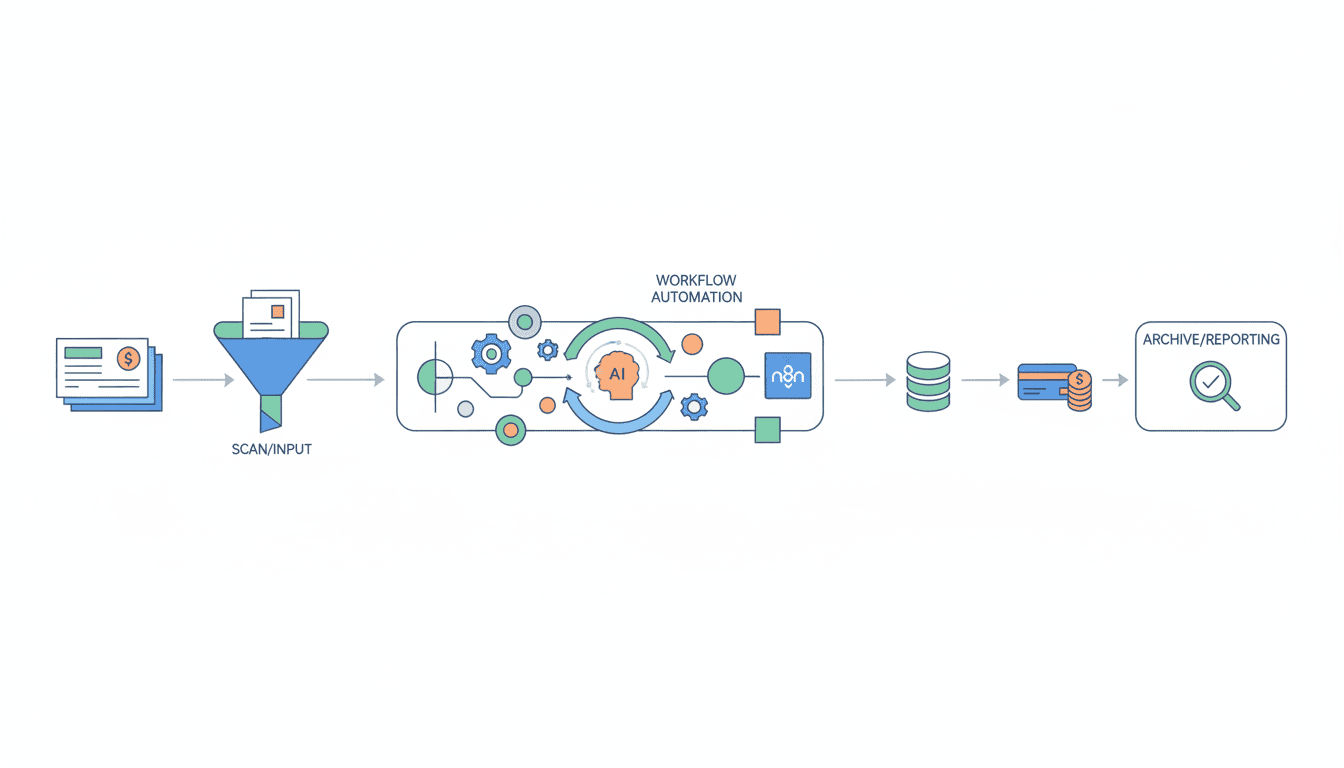
OCR (Optical Character Recognition) technology works through a multi-stage process to convert physical or digital invoice documents into machine-readable data:
- Document capture: The system receives invoice images through scanning, email, or upload
- Image preprocessing: Enhancement of image quality for better recognition accuracy
- Text recognition: OCR algorithms identify and extract text from the document
- Data extraction: Key fields like vendor name, invoice number, date, line items, and amounts are identified
- Validation: Extracted data is verified for accuracy against established rules
- Data transfer: Validated information is sent to accounting or ERP systems
Modern OCR invoice processing systems use machine learning to improve accuracy over time. As the system processes more of your invoices, it becomes more adept at recognizing your specific vendors’ invoice formats and data patterns.
Benefits of Using OCR for Small Businesses
Implementing OCR invoice processing provides numerous advantages for small businesses:
- Time savings: Reduces data entry time by up to 90%
- Improved accuracy: Minimizes human error in data entry
- Faster processing: Decreases invoice processing time from days to hours or minutes
- Cost reduction: Lowers processing costs by eliminating manual handling
- Better cash flow management: Enables timely payments and early payment discounts
- Enhanced visibility: Provides real-time tracking of invoice status
Automate Your Accounts Payable Workflow
To fully benefit from invoice automation, small businesses need to automate accounts payable processes from end to end. A well-designed workflow eliminates bottlenecks and creates transparency throughout the invoice lifecycle.
Steps to Streamline Accounts Payable
Follow these key steps to automate your accounts payable workflow:
- Standardize invoice receipt: Create a centralized inbox or portal for all incoming invoices
- Implement automated data capture: Use OCR to extract invoice information
- Set up validation rules: Create automated checks for duplicate invoices, matching with purchase orders, and mathematical accuracy
- Design approval workflows: Configure multi-level approvals based on invoice amounts, departments, or other criteria
- Automate payment scheduling: Set up automated payment timing to optimize cash flow
- Establish audit trails: Ensure all actions are documented for compliance and transparency
By automating your accounts payable workflow, you can dramatically reduce the time spent on invoice processing while improving control over outgoing payments. Many small businesses find they can use n8n workflow examples to connect different systems in their accounts payable process, creating custom automation solutions that perfectly fit their business needs.
Integrating Automation into Your Existing Processes
Successfully integrating accounts payable automation requires careful planning:
- Map current processes: Document your existing invoice handling workflows
- Identify pain points: Determine bottlenecks and inefficiencies to address
- Phase implementation: Start with core functions and gradually expand automation
- Train team members: Ensure staff understands how to use new systems
- Develop contingency plans: Create procedures for handling exceptions
Successful integration often involves connecting your invoice automation system with other business software, including accounting systems, ERP platforms, and banking interfaces. Many modern systems offer pre-built integrations, while others may require custom API connections which can be built using tools like n8n.
Utilizing Small Business Finance Automation Strategies
Invoice automation is just one component of a broader small business finance automation strategy. When implemented as part of a comprehensive approach, automation can transform your entire financial operation.
The Importance of Financial Automation
Small business finance automation delivers critical benefits:
- Reduced operational costs: Less manual processing means lower labor costs
- Improved accuracy: Automation eliminates human error in calculations and data entry
- Enhanced compliance: Automated systems maintain consistent documentation
- Better decision-making: Real-time financial data provides insights for business decisions
- Increased scalability: Automated systems grow with your business without proportional cost increases
A comprehensive small business finance automation strategy connects various financial processes, creating a seamless flow of information from purchase to payment to reporting.
Tips for Small Businesses to Implement Finance Automation
Follow these practical tips for successful finance automation implementation:
- Start small: Begin with one process like invoice automation before expanding
- Choose cloud-based solutions: These typically offer faster implementation and better accessibility
- Focus on integration: Select tools that connect with your existing software
- Measure results: Track time saved, error reduction, and processing costs
- Involve your team: Get input from those who handle financial processes daily
Resources
Recommended Tools and Software
These tools can help small businesses automate their invoice processing:
- Bill.com: Comprehensive accounts payable and receivable automation
- Xero: Cloud accounting with invoice automation features
- n8n: Open-source workflow automation tool that can connect various financial systems
- QuickBooks: Popular accounting software with invoice automation capabilities
- Zapier: Integration platform to connect financial apps without coding
For businesses seeking to create custom automation solutions, what is n8n provides an excellent introduction to this powerful workflow automation platform that can connect virtually any system in your business.
Further Reading and Educational Materials
Expand your knowledge with these resources:
- Small Business Administration (SBA) guides on financial management
- Industry reports on accounts payable automation trends
- Webinars and tutorials from automation software providers
- Case studies of successful automation implementations
Many businesses have found success by implementing AI agent for small business solutions that can handle routine financial tasks while providing insights that improve decision-making.
Conclusion
Automating invoice processing is no longer just an option for small businesses—it’s a competitive necessity. By implementing the right automation tools and strategies, small businesses can dramatically reduce the time and resources spent on invoice management while improving accuracy and gaining valuable financial insights.
Start by selecting invoice automation software that matches your business needs, implement OCR for efficient data capture, and build comprehensive accounts payable workflows. As part of a broader finance automation strategy, these steps will transform your financial operations, freeing up resources to focus on growth and innovation.
Remember that successful automation is an ongoing journey. Begin with core processes, measure results, and continuously refine your approach as your business evolves and technology advances.
FAQ
How much does invoice automation software typically cost for small businesses?
Invoice automation software for small businesses typically ranges from $15-150 per month, depending on features and processing volume. Many providers offer tiered pricing based on the number of invoices processed monthly. Some basic solutions have free plans with limited features, while comprehensive automation platforms may cost more but deliver greater value through time savings.
How long does it take to implement invoice automation for a small business?
Implementation time varies depending on the complexity of your existing processes and the solution chosen. Basic invoice automation can be set up in as little as 1-2 days, while comprehensive accounts payable automation integrated with existing systems typically takes 2-4 weeks. Allow additional time for team training and process refinement.
Can invoice automation work with handwritten invoices?
Yes, modern OCR technology can process handwritten invoices, though accuracy may be lower than with digital or typed invoices. The best systems use AI and machine learning to improve handwriting recognition over time. For businesses that frequently receive handwritten invoices, look for solutions that specifically highlight handwriting recognition capabilities.
What kind of ROI can small businesses expect from invoice automation?
Small businesses typically see ROI within 3-6 months after implementing invoice automation. Cost savings come from reduced labor (up to 80% time reduction), fewer payment errors, captured early payment discounts, and eliminated late fees. Additional benefits include better vendor relationships, improved audit compliance, and fraud reduction.
Is invoice automation secure for handling sensitive financial data?
Reputable invoice automation solutions offer enterprise-grade security features including encryption, access controls, and audit trails. Look for providers that comply with relevant standards like SOC 2, GDPR, or PCI DSS if you’re processing payment information. Cloud-based solutions often provide better security than in-house systems as they benefit from continuous monitoring and regular security updates.