How to automate lead generation with n8n
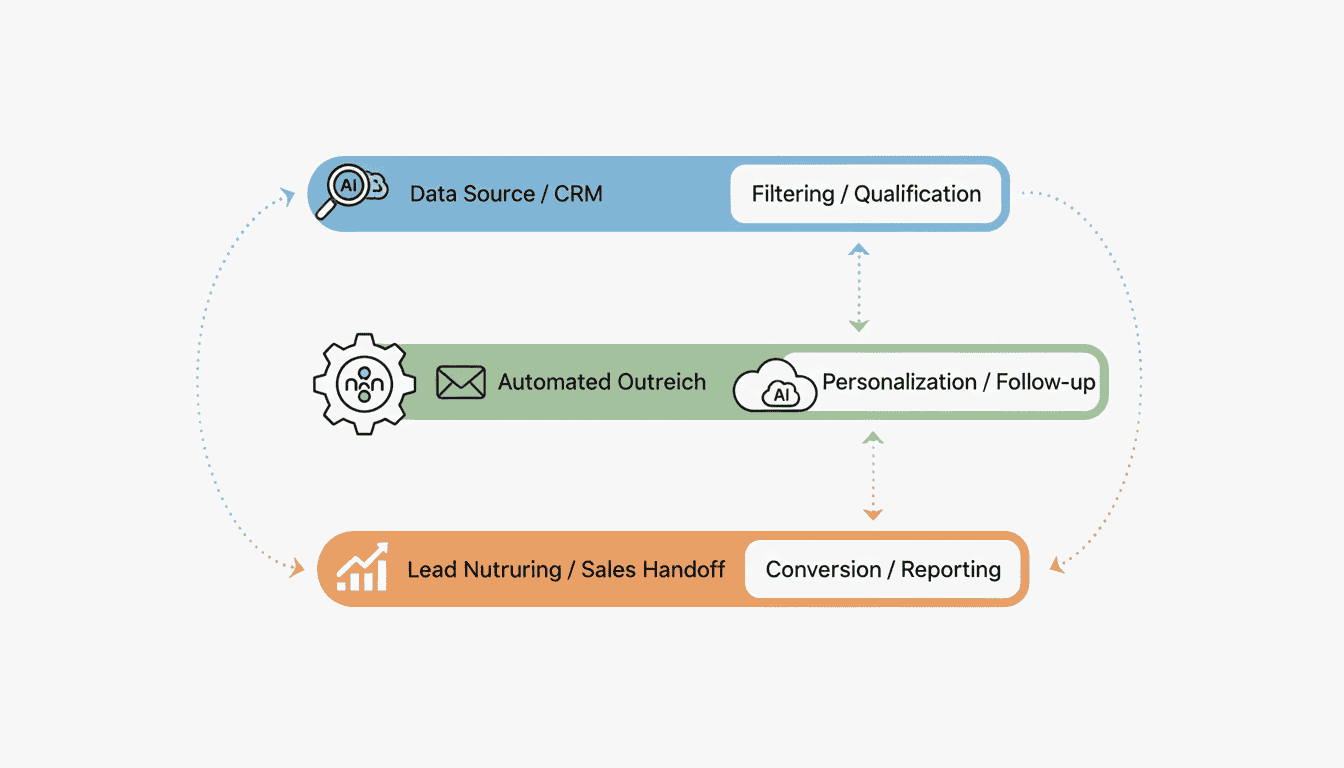
Creating an efficient lead generation system is crucial for business growth, and automation is the key to scaling your efforts without increasing workload. n8n, a powerful workflow automation tool, offers a flexible solution for building customized lead generation workflows that can capture, process, and qualify leads automatically. In this guide, we’ll walk through how to build an automated lead generation workflow in n8n that will help you streamline your lead management process from start to finish.
Setting Up Lead Capture in n8n
The foundation of any lead generation workflow is an effective lead capture system. n8n provides multiple ways to capture leads from various sources and funnel them into your sales process.
Integrating Lead Capture Forms
To begin your lead capture n8n setup, you’ll need to integrate forms that collect prospect information. n8n supports several approaches:
- Connect existing form tools like Typeform, Google Forms, or JotForm
- Create webhooks that receive data from custom forms on your website
- Use n8n’s HTTP Request nodes to pull data from form submission APIs
For example, to integrate with Typeform, add a Typeform trigger node that activates whenever someone submits your lead form. Configure the node with your Typeform API credentials and select the specific form you want to monitor.
Connecting to Your CRM
Once you’ve set up lead capture, the next step is connecting to your CRM system to store and manage lead information. An n8n CRM lead workflow typically involves:
- Setting up API connections to your CRM (Salesforce, HubSpot, Pipedrive, etc.)
- Mapping form fields to corresponding CRM fields
- Configuring error handling for failed CRM operations
For example, to connect to HubSpot, add a HubSpot node after your form trigger and configure it to create a new contact or update an existing one based on the email address. You’ll need to map fields from your form to the corresponding HubSpot contact properties.
Automating Lead Collection with n8n
After setting up your basic lead capture system, the next step is to automate the collection process to ensure no lead is left behind.
Creating a Lead Collection Workflow
To automate lead collection n8n offers several approaches:
- Schedule regular imports from external databases
- Monitor email inboxes for lead inquiries
- Scan social media mentions or direct messages
A comprehensive lead collection workflow might include:
| Source | n8n Node | Function |
| Website Forms | Webhook | Captures form submissions |
| IMAP | Monitors inbox for inquiries | |
| Social Media | Twitter/LinkedIn | Captures mentions or messages |
| Event Registrations | Eventbrite/Zoom | Imports attendee data |
This approach is similar to AI agent workflows where multiple processes work together to achieve a specific outcome.
Using Webhooks for Instant Data Capture
Webhooks provide real-time lead capture capabilities, making them an essential component of any automated lead collection system:
- Create a webhook node in n8n to generate a unique URL
- Configure your forms to send data to this webhook URL upon submission
- Set up the webhook node to parse incoming data and pass it to subsequent nodes
This approach enables instant lead processing as soon as a prospect submits their information, reducing response time and improving conversion rates.
Implementing n8n Lead Scoring
Lead scoring helps prioritize your sales efforts by identifying the most promising prospects. n8n lead scoring can be automated to ensure consistent evaluation.
Defining Scoring Criteria
Effective lead scoring requires clear criteria based on demographic, firmographic, and behavioral data:
- Demographic factors: job title, industry, company size
- Engagement behaviors: website visits, email opens, content downloads
- Explicit interest indicators: product page visits, pricing page views
In n8n, implement scoring using Function nodes that assign point values based on your predefined criteria. For example:
Automating Score Updates
Once scoring criteria are established, automate the scoring process with:
- Trigger nodes that activate when new lead activities occur
- Function nodes that calculate updated scores based on new information
- CRM nodes that update lead scores in your database
Consider implementing what is n8n explaining as a central orchestration tool for your lead scoring system, especially when integrating with multiple data sources.
Qualifying Leads in n8n
Lead qualification separates sales-ready leads from those requiring further nurturing. n8n lead qualification automates this process for greater efficiency.
Setting Up Qualification Criteria
Define what makes a qualified lead for your business:
- Minimum score threshold
- Specific demographic requirements (budget, authority, need, timeline)
- Engagement patterns indicating purchase readiness
Implement these criteria in n8n using a combination of IF nodes and Function nodes that evaluate lead data against your qualification standards.
Using Conditions to Filter Leads
Implement conditional logic in your workflow to route leads appropriately:
- Add IF nodes to evaluate lead scores and attributes
- Create separate paths for qualified vs. unqualified leads
- Route qualified leads to sales notification workflows
- Direct unqualified leads to nurturing sequences
This approach ensures your sales team focuses only on the most promising opportunities while marketing continues to develop less mature leads.
Resources
Helpful n8n Tutorials
To enhance your n8n lead generation workflow, check out these helpful resources:
- n8n workflow examples for small businesses
- n8n Official Documentation for comprehensive guides
- n8n Community Forum for troubleshooting and inspiration
Integrations for Enhanced Functionality
Extend your lead generation workflow with these powerful integrations:
- Clearbit for lead enrichment
- Zapier for additional integration options
- AI agent for small business to enhance lead qualification intelligence
Conclusion
Building an automated lead generation workflow in n8n can significantly improve your sales efficiency by streamlining lead capture, collection, scoring, and qualification processes. By implementing the strategies outlined in this guide, you can create a customized workflow that aligns with your specific business needs and sales process.
The power of n8n lies in its flexibility and ability to connect with virtually any tool in your existing tech stack. Start small with basic automation and gradually expand your workflow as you become more familiar with n8n’s capabilities. With consistent refinement, your lead generation workflow will become increasingly effective at identifying and qualifying the prospects most likely to convert into customers.
FAQ
What is n8n and why is it good for lead generation?
n8n is an open-source workflow automation tool that allows you to connect different applications and automate tasks between them. It’s excellent for lead generation because it can seamlessly integrate with CRMs, form tools, and communication platforms to create end-to-end lead processing workflows without requiring coding skills.
Do I need technical skills to build a lead generation workflow in n8n?
While n8n has a visual interface that makes it accessible to non-technical users, some basic understanding of APIs and data structures will help. Many integrations work out-of-the-box, but more complex scenarios might require some JavaScript knowledge for data transformation.
Can n8n integrate with my existing CRM system?
n8n supports integration with most popular CRM systems including Salesforce, HubSpot, Pipedrive, and many others. If your CRM has an API, n8n can likely connect to it, even if there’s no pre-built integration.
How can I test my lead generation workflow before making it live?
n8n provides testing features that allow you to run individual nodes or the entire workflow with sample data. This lets you verify that your workflow behaves as expected before connecting it to your live lead sources and CRM system.
Is it possible to set up lead nurturing sequences in n8n?
Yes, you can create sophisticated lead nurturing sequences by combining n8n with email marketing tools. You can set up workflows that trigger email sequences based on lead scores, behaviors, or other criteria, creating a fully automated nurturing process.