n8n Nodes & Triggers Explained (Beginner Friendly)
Automation has become a cornerstone of modern workflows, and n8n stands out as a powerful, flexible automation tool that’s gaining popularity. At the heart of n8n’s functionality are nodes and triggers – the building blocks that make your automation workflows possible. If you’re new to n8n or looking to deepen your understanding, this guide will walk you through n8n nodes and triggers in a beginner-friendly way, helping you harness the full potential of this versatile automation platform.
Understanding n8n Nodes
The foundation of any n8n workflow lies in understanding its nodes. Let’s explore what these essential components are and how they function within the n8n ecosystem.
what is n8n trigger nodes
What Are n8n Nodes?
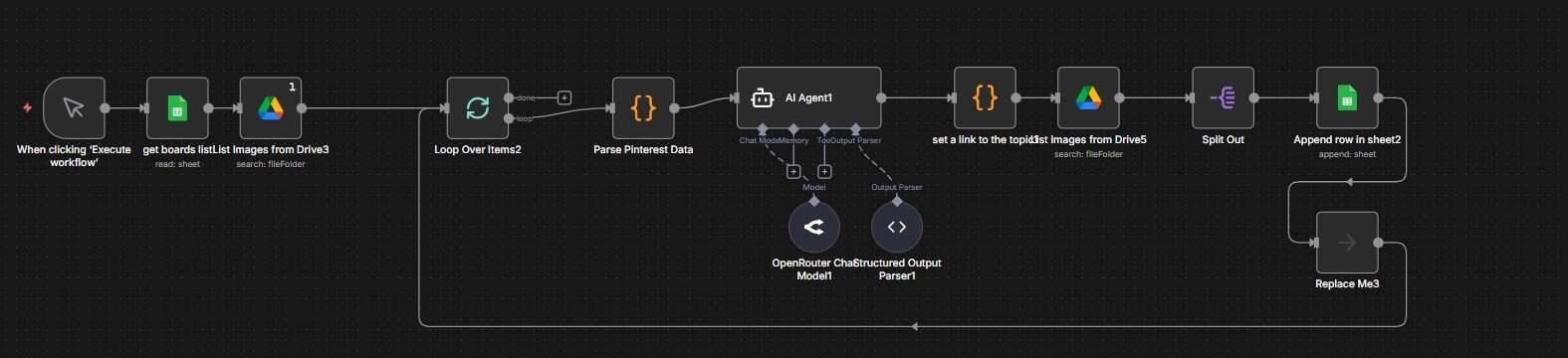
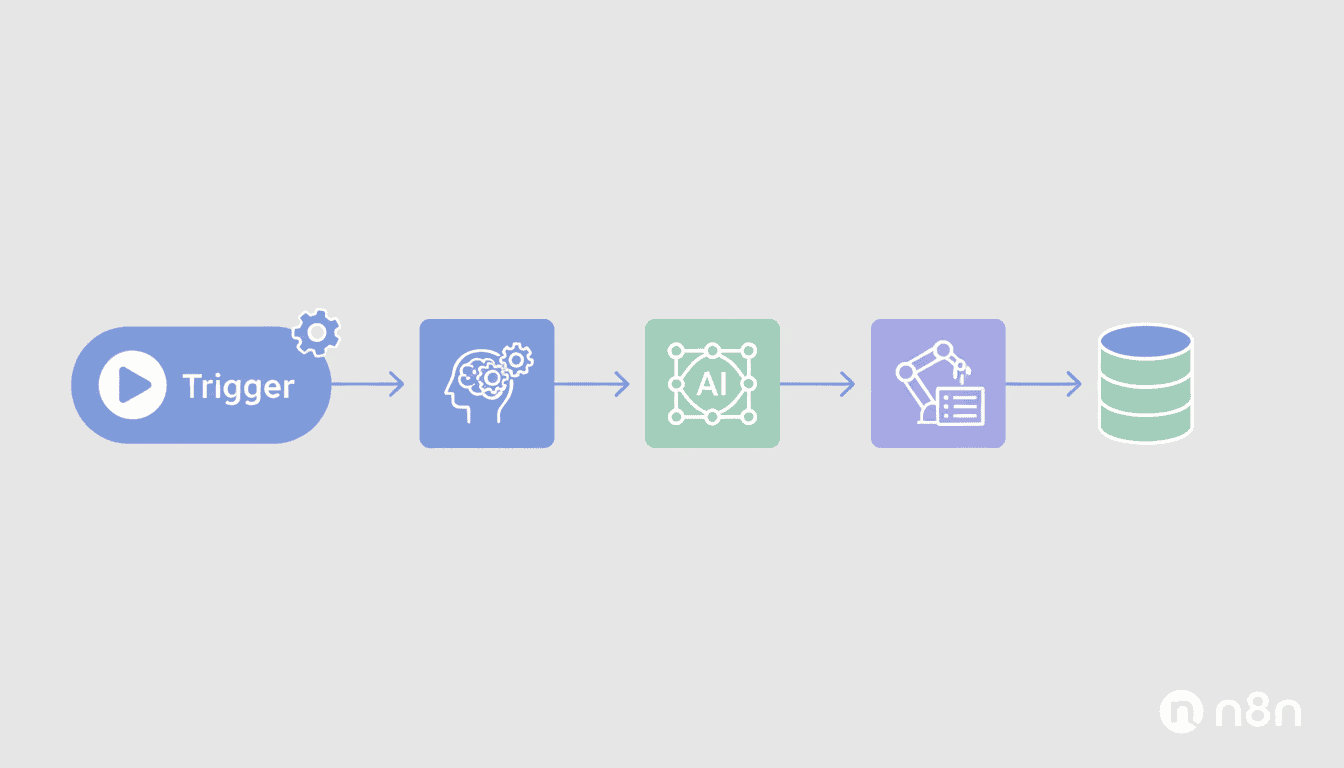
Nodes in n8n are the fundamental building blocks that perform specific actions within your automation workflows. Think of nodes as specialized workers, each with a unique skill set. Each node is designed to perform a specific function – whether that’s fetching data from an API, transforming information, or sending an email.
These modular components connect together to create workflows that automate tasks across different applications and services. Visually represented as blocks in the n8n interface, nodes are connected by lines that show how data flows from one node to another, creating a complete automation sequence.
Types of n8n Nodes
n8n offers a diverse array of nodes categorized by their functionality:
- Action Nodes: Perform specific tasks like sending emails, creating records, or posting to social media.
- Core Nodes: Provide essential functionality such as HTTP requests, data transformation, and flow control.
- Service-specific Nodes: Connect to third-party services like Google Sheets, Slack, Airtable, and hundreds of others.
- Helper Nodes: Assist with workflow organization and data manipulation, including Split In Batches, Merge, and IF nodes.
- Function Nodes: Allow custom JavaScript code execution for specialized processing needs.
With over 200 nodes available in n8n, you can connect to virtually any service or perform almost any automation task you might need.
How to Use n8n Nodes
Using nodes in n8n follows a straightforward process:
- Add a node: Click the “+” button in the n8n workflow editor and select from the available node types.
- Configure the node: Set up the node’s parameters according to your needs. This might include API credentials, data mapping, or specific actions.
- Connect nodes: Link nodes together by dragging lines between their input and output points to establish the data flow.
- Test execution: Run the workflow to test if the nodes are performing as expected.
- Refine and adjust: Based on test results, fine-tune the node configurations for optimal performance.
Most nodes in n8n follow a consistent interface pattern, making it easier to learn new nodes once you’ve mastered a few basic ones.
| Node Complexity | Examples | Best For |
| Simple | Set, NoOp, Merge | Beginners, basic data handling |
| Moderate | HTTP Request, Google Sheets, Slack | Common automation tasks |
| Complex | Function, FTP, Complex API integrations | Advanced users, specialized workflows |
Exploring n8n Triggers
While nodes handle the action within workflows, triggers are responsible for initiating these workflows. Understanding n8n triggers is crucial for creating responsive automations.
What Are n8n Triggers?
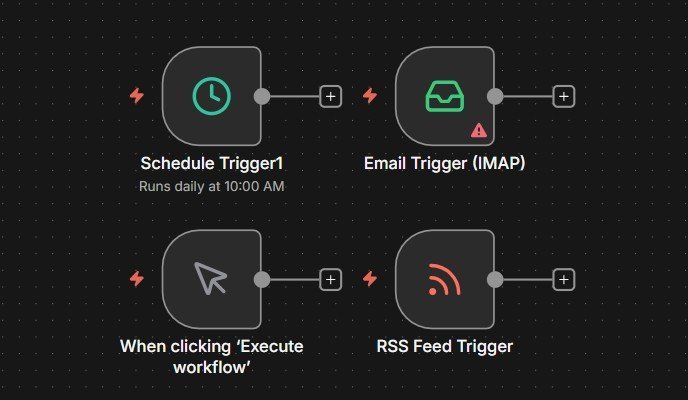
Triggers in n8n are specialized nodes that start a workflow execution in response to specific events. Unlike regular nodes that process data when a workflow is running, trigger nodes actively listen for events and automatically initiate workflow execution when those events occur.
Triggers transform n8n from a manual tool into a responsive system that can react to events in real-time. They’re always placed at the beginning of a workflow and determine when and why that workflow should run.
Common Trigger Types in n8n
n8n offers several types of triggers to initiate your workflows:
- Webhook Triggers: Execute workflows when HTTP requests are received at a specific URL.
- Schedule Triggers: Run workflows at specified times or intervals using cron expressions.
- Service-specific Triggers: Start workflows when events happen in connected services (like new emails, Slack messages, or database changes).
- Form Triggers: Initiate workflows when a custom form is submitted.
- Manual Triggers: Allow workflows to be started manually through the n8n interface.
Each trigger type serves different use cases, from time-based automations to event-driven workflows that respond to external systems.
Configuring n8n Triggers
Setting up triggers in n8n involves these key steps:
- Select a trigger node: Add it as the first node in your workflow.
- Configure trigger settings: Specify the conditions that will activate the trigger.
- Test the trigger: Verify that it responds correctly to the specified events.
- Connect to action nodes: Build the rest of your workflow to execute once the trigger activates.
For webhook triggers, n8n provides a unique URL that external services can call. For scheduled triggers, you’ll need to specify timing using cron syntax or the visual schedule builder. Service-specific triggers require authentication with the respective service and configuration of the events to monitor.
Overview of n8n Features
Beyond nodes and triggers, n8n offers a comprehensive set of features that make it a powerful automation platform.
Key Features of n8n
n8n stands out with several distinctive features:
- Self-hostable: Run n8n on your own infrastructure for complete data control. or on n8n hosted Hostinger
- Fair-code licensed: Open source with fair usage terms that balance openness with sustainability.
- Visual workflow builder: Create complex automations with an intuitive drag-and-drop interface.
- Error handling: Built-in mechanisms to handle errors and retries.
- Execution history: Review past workflow runs for debugging and monitoring.
- Conditional workflows: Create branches and decision points based on data conditions.
- Credentials management: Securely store and manage API keys and authentication details.
These features make n8n particularly suitable for businesses and individuals who need powerful automation while maintaining control over their data and processes.
Benefits of Using n8n Features
The comprehensive feature set of n8n offers several advantages:
- Privacy and data sovereignty: Keep sensitive data on your own servers.
- Customizability: Tailor automations to exact specifications with JavaScript functions.
- Cost-effectiveness: Self-hosting can be more economical for high-volume workflows.
- Flexibility: Combine services that might not normally integrate with each other.
- Transparency: See exactly how your automations work and modify them at will.
- No vendor lock-in: Own your automation infrastructure completely.
These benefits make n8n an attractive option compared to closed-source alternatives, especially for organizations with specific compliance or customization requirements.
Integrating n8n with Other Applications
One of n8n’s greatest strengths is its ability to connect diverse applications:
- API integrations: Connect to any service with an API, even without dedicated nodes.
- Database connections: Work directly with MySQL, PostgreSQL, MongoDB, and other databases.
- Cloud services: Integrate with AWS, Google Cloud, Azure, and other cloud platforms.
- Local systems: Connect to file systems, run shell commands, or interact with local services.
- Custom webhooks: Create endpoints that other systems can call to trigger workflows.
This integration capability makes n8n ideal for creating comprehensive automation ecosystems that span multiple tools and platforms.
Resources
Further Reading on n8n
To deepen your understanding of n8n, explore these valuable resources:
- Official n8n Documentation: Comprehensive guides, tutorials, and reference materials.
- n8n Blog: Regular updates on new features and use case examples.
- YouTube Tutorials: Visual guides for setting up various workflows.
- GitHub Repository: Access the source code and contribute to n8n’s development.
- Workflow Templates: Pre-built workflows that can be imported and customized.
These resources provide both beginner tutorials and advanced techniques for mastering n8n automation.
n8n Community and Support
Join the active n8n community for assistance and inspiration:
- n8n Forum: Ask questions, share workflows, and learn from other users.
- Discord Channel: Real-time discussions with the community and n8n team members.
- Regular Webinars: Live demonstrations and Q&A sessions.
- GitHub Issues: Report bugs or request features.
- Social Media: Follow n8n on Twitter and LinkedIn for updates and tips.
The supportive community is one of n8n’s greatest assets, offering help for beginners and collaboration opportunities for experienced users.
Conclusion
n8n nodes and triggers form the foundation of a powerful, flexible automation platform that empowers users to create custom workflows with unprecedented control. By understanding how nodes perform specific actions and triggers initiate workflows, you can build automations that streamline processes, connect disparate systems, and save valuable time.
Whether you’re just starting your automation journey or looking to expand your existing skills, n8n offers the tools to create sophisticated workflows while maintaining complete data sovereignty. As you experiment with different nodes and triggers, you’ll discover the full potential of this versatile platform to transform your personal and professional workflows.
Start small, gradually expand your automations, and leverage the extensive n8n community as you build your automation expertise. With practice, you’ll be creating complex, powerful workflows that make technology work for you.
Frequently Asked Questions
What makes n8n different from other automation platforms?
n8n stands out by being self-hostable and fair-code licensed, giving users complete control over their data and infrastructure. It combines powerful features with the ability to run on your own servers, making it ideal for privacy-conscious users and organizations with specific compliance requirements.
Do I need programming skills to use n8n nodes and triggers?
No, most n8n workflows can be created without programming using the visual interface. However, basic JavaScript knowledge can be helpful for advanced customization using Function nodes. The platform is designed to be accessible to non-programmers while offering depth for those with coding skills.
How many nodes and triggers does n8n currently support?
n8n supports over 200 nodes and continues to add more regularly. These include nodes for popular services like Google Sheets, Slack, and Airtable, as well as core functionality nodes for HTTP requests, data transformation, and workflow control.
Can n8n connect to services that don’t have dedicated nodes?
Yes, the HTTP Request node allows you to connect to any service with an API, even without dedicated nodes. This makes n8n extremely versatile and future-proof, as you’re not limited only to pre-built integrations.
Is n8n suitable for enterprise-level automation needs?
Absolutely. n8n’s self-hosting capability, robust error handling, and extensive integration options make it well-suited for enterprise environments. Many organizations use n8n for mission-critical workflows, particularly when data sovereignty and customization are important requirements.
How often are new nodes added to n8n?
The n8n team and community regularly add new nodes, with updates typically released every few weeks. Users can also create and contribute their own custom nodes if needed for specific use cases.