
n8n vs Make.com: Detailed Side-by-Side Comparison
Choosing the right automation platform can significantly impact your workflow efficiency and business productivity. In this comprehensive comparison of n8n vs Make.com, we’ll examine how these two popular automation tools stack up against each other across key dimensions. Whether you’re looking to streamline business processes, integrate multiple applications, or create complex workflow automations, understanding the unique strengths and limitations of each platform is crucial for making an informed decision.
Key Features of n8n
n8n has emerged as a powerful player in the automation space with its open-source approach and flexible architecture. Let’s explore what makes n8n stand out in terms of features and capabilities.
Automation Capabilities
n8n automation capabilities are robust and designed with flexibility in mind. The platform offers a node-based workflow builder that allows users to create complex automation sequences with conditional logic, loops, and error handling. One of n8n’s standout features is its ability to execute workflows both in the cloud and on-premises, giving businesses greater control over their data.
n8n supports both simple linear workflows and complex branching scenarios through its “IF” nodes and conditional execution paths. Users can implement error handling strategies with the “Error Trigger” nodes to create fault-tolerant workflows. The platform also offers the ability to schedule workflows based on time intervals, specific dates, or cron expressions.
Integrations Offered
The range of n8n integrations is extensive and growing steadily. As of now, n8n offers connections to over 200 services and applications, including popular tools like Slack, Google Sheets, Airtable, GitHub, and various CRM systems. The platform provides both triggers (events that start workflows) and actions (tasks performed within workflows) for these integrations.
What sets n8n integrations apart is the platform’s open architecture, which allows users to create custom nodes for services not natively supported. This flexibility makes n8n particularly valuable for organizations with specialized or proprietary systems that need to be included in automation workflows.
- Native integrations with major cloud services
- HTTP Request nodes for connecting to any API
- Database nodes for SQL and NoSQL databases
- Webhook capabilities for real-time event processing
- Custom node creation for specialized needs
User Interface Design
The n8n UI features a clean, intuitive visual workflow builder that represents automation sequences as a series of connected nodes. The interface employs a dark-themed design that reduces eye strain during extended sessions of workflow creation.
The n8n UI emphasizes visibility of data flow between nodes, making it easier to understand how information passes through your workflow. Each node can be expanded to reveal its configuration options, and users can test nodes individually to verify their functionality before executing the entire workflow.
While the interface is powerful, it does have a slightly steeper learning curve compared to some competitors, as it exposes more technical details to the user. However, this approach provides greater transparency and control over workflow execution.
Key Features of Make.com
Make.com (formerly Integromat) has built a reputation as a user-friendly yet powerful automation platform. Let’s examine its key features and what sets it apart in the automation landscape.
Automation Capabilities
Make.com automation features center around its visual scenario builder, which represents workflows as a series of modules connected in a circular or linear pattern. The platform excels at making complex automations accessible through its intuitive interface.
Make.com offers robust data transformation capabilities, allowing users to map, filter, and manipulate data between different services without coding. The platform’s iterator modules enable processing of multiple items in a single execution, while aggregators can combine multiple pieces of data into collections.
One of Make.com’s distinctive features is its detailed execution history, which provides comprehensive logs of each workflow run, making troubleshooting significantly easier. The platform also offers real-time execution monitoring, allowing users to observe data flowing through their scenarios as they run.
Integrations Offered
Make.com integrations are one of its strongest selling points, with over 1,000 pre-built app connections available out of the box. This extensive library includes popular business tools like Slack, Trello, Google Workspace, Microsoft 365, Salesforce, and many more.
Each Make.com integration typically offers multiple modules for different functions within the connected service. For example, the Gmail integration includes separate modules for sending emails, searching for emails, creating drafts, and managing labels.
| Integration Category | Examples |
| Project Management | Asana, Trello, Monday.com, Jira |
| Communication | Slack, Discord, Email platforms |
| CRM Systems | Salesforce, HubSpot, Pipedrive |
| Productivity | Google Workspace, Microsoft 365 |
| E-commerce | Shopify, WooCommerce, Magento |
User Interface Design
The Make.com UI is widely praised for its intuitive design and user-friendly approach. The platform’s scenario builder visually represents data flow with a distinctive circular pattern, though linear arrangements are also supported.
Make.com’s interface emphasizes accessibility for users of all technical levels, with clear labeling, helpful tooltips, and contextual guidance. The platform’s module configuration panels are logically organized, making it straightforward to set up even complex operations.
One of the most appreciated aspects of the Make.com UI is its real-time data mapping feature, which shows live previews of how data will be transformed between modules. This visual approach to data handling significantly reduces the learning curve for new users while still offering the depth needed for complex automations.
Comparing Pricing Models
The cost structure of automation tools can significantly impact their long-term value. Let’s examine how n8n and Make.com approach pricing and what you get at different tiers.
n8n Pricing Structure
The n8n cost model is somewhat unique in the automation space due to its open-source nature. The core n8n platform is available as a free, self-hosted option under a fair-code license. This allows organizations with technical resources to run n8n on their own infrastructure without any subscription fees.
For those seeking a managed solution, n8n offers cloud-hosted plans starting with a free tier that includes 1,000 workflow executions per month. Paid plans begin at around $20 per month and scale up based on execution volume, number of users, and additional features like role-based access control and priority support.
I personally use self hosted n8n by Hostinger.
Enterprise pricing for n8n is available for organizations requiring higher execution volumes, dedicated support, and advanced security features. These plans are typically custom-quoted based on specific requirements.
Make.com Pricing Structure
Make.com cost is structured around a tiered subscription model based primarily on the number of operations (individual actions within scenarios) and the amount of data transfer required. The platform offers a free tier that includes 1,000 operations per month, which is suitable for simple automations or testing.
Paid plans for Make.com start at approximately $9 per month and increase based on operation volume, ranging from 10,000 to unlimited operations. Higher tiers also unlock additional features such as more complex scenarios, increased data transfer limits, and shorter minimum intervals between scenario executions.
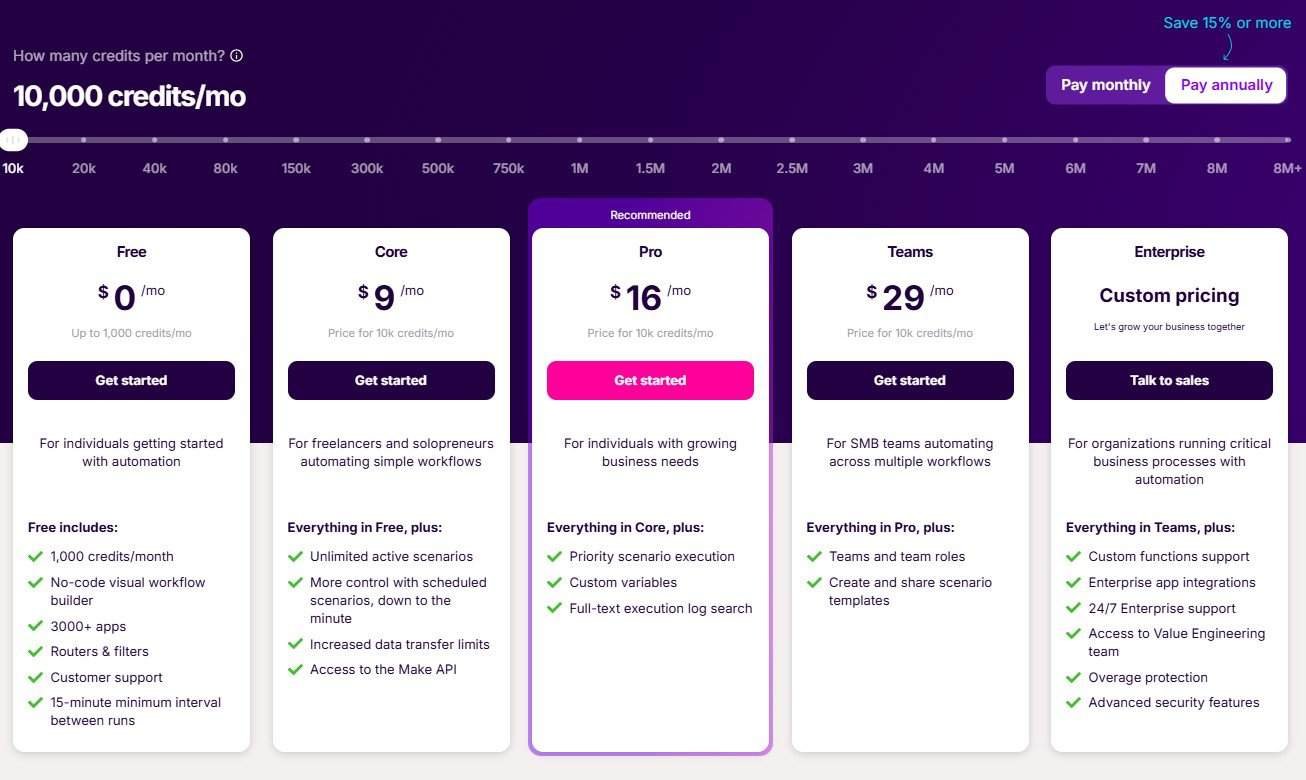
Make.com also offers team-focused plans that include collaboration features, role-based permissions, and shared resources across multiple users. Enterprise options provide dedicated support, custom integrations, and advanced security controls.
Value for Money
When comparing n8n vs Make pricing, several factors should be considered beyond the raw subscription costs. n8n typically offers more value for organizations with in-house technical resources who can leverage the self-hosted option, effectively eliminating ongoing subscription fees. The platform also tends to be more cost-effective for high-volume automations since it doesn’t charge strictly per operation.
Make.com often provides better value for small to medium businesses without dedicated technical staff, as its cloud-only approach eliminates infrastructure management concerns. Its extensive integration library can also reduce development costs for connecting to popular services.
For users with moderate automation needs, Make.com’s mid-tier plans typically offer a good balance of capabilities and cost. For enterprise-level requirements with high volumes, n8n’s pricing model may scale more favorably, especially when factoring in the self-hosting option.
Ease of Use Comparison
The learning curve and day-to-day usability of automation platforms can significantly impact productivity and adoption rates. Let’s compare how n8n and Make.com perform in terms of user experience.
Getting Started with n8n
The n8n setup process varies depending on whether you’re using the cloud or self-hosted version. For the cloud version, setup is straightforward—create an account, confirm your email, and you can immediately begin building workflows. The self-hosted option requires more technical knowledge, involving server setup, database configuration, and possibly Docker containers.
Once installed, n8n provides an interactive tutorial that guides new users through creating their first workflow. The platform offers comprehensive documentation, including examples and use cases, though some users report that the documentation can be somewhat technical in nature.
New users may face a learning curve with n8n’s node-based approach, especially when dealing with data transformations and conditional logic. However, the platform’s transparency about data flow between nodes helps users understand what’s happening at each step of their workflow.
Getting Started with Make.com
Make.com setup is entirely cloud-based and requires only an email address to begin. After account creation, users are guided through an intuitive onboarding process that includes interactive tutorials and template scenarios that can be customized for common use cases.
The platform’s scenario templates provide a significant advantage for new users, offering pre-built automation workflows for common business processes that can be used as starting points. Make.com also excels at providing contextual help throughout the interface, with tooltips and guidance appearing as users navigate the platform.
Make.com’s visual approach to data mapping and transformation is particularly beginner-friendly, allowing users to see exactly how information flows between services with minimal technical knowledge required.
User Feedback on Usability
n8n user feedback generally highlights the platform’s flexibility and power as its strongest attributes. Users appreciate the ability to customize workflows with JavaScript functions and create their own nodes when needed. The open-source nature of n8n also receives positive mentions, particularly from organizations with security or compliance requirements that favor self-hosting.
Make.com user feedback consistently praises the platform’s intuitive interface and extensive integration library. Users report being able to create useful automations quickly, even without prior experience with similar tools. The platform’s detailed execution history and troubleshooting capabilities are frequently mentioned as strengths that help users identify and resolve issues efficiently.
Both platforms receive criticism in some areas. n8n users occasionally note that the learning curve can be steep for non-technical team members, while Make.com users sometimes mention limitations in complex data transformations that might require workarounds or additional steps.
Ideal Use Cases for n8n and Make.com
Different automation platforms excel in different contexts. Understanding the optimal scenarios for each tool can help you make the right choice for your specific needs.
When to Choose n8n
n8n recommendations typically center around use cases that require high levels of customization, security, or control. The platform is an excellent choice for:
- Organizations with strict data privacy requirements that necessitate self-hosting
- Teams with development resources who can leverage n8n’s JavaScript capabilities for custom logic
- Businesses needing to integrate with internal or proprietary systems through custom nodes
- Enterprises requiring on-premises deployment due to compliance regulations
- Scenarios involving complex data transformations or workflow logic
n8n’s open-source nature makes it particularly suitable for organizations that value transparency and want to avoid vendor lock-in. Its ability to run workflows locally also makes it valuable for automations that need to access resources within a private network without exposing them to the internet.
When to Choose Make.com
Make.com recommendations typically focus on scenarios where ease of use and rapid implementation are priorities. The platform excels in:
- Small to medium businesses without dedicated technical staff
- Marketing, sales, and operations teams needing to connect popular SaaS applications
- Use cases requiring quick implementation with minimal learning curve
- Scenarios benefiting from Make.com’s extensive library of pre-built integrations
- Teams that value visual workflow design and intuitive data mapping
Make.com’s strength in providing detailed execution logs and visual monitoring makes it particularly valuable for business users who need to troubleshoot their own automations without developer assistance.
Resources
Further Reading
To deepen your understanding of these automation platforms, consider exploring these additional resources:
- Official n8n documentation and community forums
- Make.com knowledge base and tutorial videos
- GitHub repositories for n8n custom nodes and examples
- Industry comparison reports on automation platforms
- Case studies from companies implementing these tools
Tools and Tutorials
These practical resources can help you get more value from either platform:
- n8n Academy – Official tutorial series for learning n8n
- Make.com Template Gallery – Pre-built scenarios for common use cases
- Community-created workflow templates for both platforms
- Chrome extensions for webhook testing and API exploration
- Integration-specific guides for connecting popular services
Conclusion
In this n8n vs Make comparison, we’ve explored how these powerful automation platforms compare across key dimensions. n8n stands out with its open-source approach, self-hosting options, and powerful customization capabilities, making it ideal for organizations with technical resources and specific security requirements. Make.com excels with its user-friendly interface, extensive integration library, and accessibility to non-technical users, making it perfect for teams seeking rapid implementation without significant technical overhead.
The choice between these platforms ultimately depends on your specific requirements, technical capabilities, and workflow complexity. Organizations prioritizing control, customization, and data privacy may lean toward n8n, while those valuing ease of use, quick deployment, and a gentle learning curve might prefer Make.com. Some organizations even use both platforms for different types of workflows, leveraging the strengths of each where they make the most sense.
Whichever platform you choose, both n8n and Make.com represent the cutting edge of workflow automation technology, offering powerful tools to streamline processes and eliminate repetitive tasks across your organization.
Frequently Asked Questions
Which is better for beginners, n8n or Make.com?
Make.com is generally considered more beginner-friendly due to its intuitive visual interface, extensive template gallery, and contextual guidance. n8n has a steeper learning curve but offers more technical flexibility for advanced users.
Can I migrate workflows between n8n and Make?
There’s no direct migration path between the two platforms. Workflows would need to be recreated manually, which involves redesigning the logic and reconfiguring the integrations according to each platform’s specific approach.
Does n8n offer a cloud-hosted option like Make?
Yes, n8n offers both self-hosted and cloud-hosted options. The cloud version provides similar convenience to Make.com, while the self-hosted version gives organizations more control over their data and infrastructure.
Which platform offers more integrations?
Make.com offers significantly more pre-built integrations (over 1,000) compared to n8n (approximately 200+). However, n8n allows users to create custom nodes, potentially connecting to any service with an API.
Is n8n truly open-source?
n8n is available under a “fair-code” license, which is not strictly open-source by some definitions but does allow you to self-host the software for free. The source code is publicly available, enabling transparency and customization.
Which platform is more cost-effective for high-volume automations?
For very high-volume automations, n8n is typically more cost-effective, especially when self-hosted, as it doesn’t charge per operation. Make.com’s pricing scales with operation volume, which can become expensive for workflows that execute frequently or process large amounts of data.